In short: The OOW Bible prepares deck officers for the MCA Officer of the Watch (Unlimited) certificate of competency. The EOOW & ETO Bible does the same for engineers and electro-technical officers. Fleet and college seats are the business version of both: you buy a pool of seats from the website, invite cadets or crew by email address, and each seat unlocks the full app for whoever holds it. Seats belong to the organisation, not the person — so when a cadet finishes their phase or an officer moves on, you reassign the seat instead of buying another. From £2.00 per seat per month at scale, minimum 25 seats. This guide walks the whole journey, screen by screen.
Key facts
| Products | The OOW Bible (deck — MIN 653 / STCW A-II/1) and The EOOW & ETO Bible (engineering — STCW A-III/1 & A-III/6) |
|---|---|
| Publisher | Azimuth Systems Ltd (UK) |
| What a seat is | One full premium licence, held by the organisation, assigned to a cadet or crew email address |
| Minimum order | 25 seats, combined across both apps |
| Price bands | £3.50 per seat / month at 25–49 · £2.75 at 50–99 · £2.00 at 100+ |
| Annual equivalent | £42.00 · £33.00 · £24.00 per seat per year — the same rate, one invoice instead of twelve |
| Currencies | GBP, EUR or USD. The figure on the page is the figure Stripe charges — no conversion is added on top |
| Billing | Card, monthly or annual, through Stripe. Seat changes, itemised invoices, card changes and cancellation are all self-service |
| Setup time | Minutes. No call, no quote, no minimum order term on monthly |
| Where it starts | azimuthsystemsltd.com/fleet |
Why buy seats rather than expensing subscriptions
Most colleges and shipping companies already pay for OOW and EOOW preparation, just untidily. A cadet asks for a study app, someone approves it on a card, it lands as a line on an expense claim, and nobody can say six months later whether the person ever opened it. Multiply that across an intake or a fleet and you have a training spend with no owner, no renewal date and no evidence.
A seat pool changes three things, and they are the three things that matter to whoever signs the invoice.
- One invoice, however many people. Not thirty receipts from thirty personal cards, and not two separate suppliers because half your people are deck and half are engineers. One subscription you resize yourself as intakes come and go.
- The seat outlives the person. A cadet who completes their phase, or an officer who moves to another company, takes their career with them — not your licence. Remove them in the dashboard and the seat is free that second, ready for the next intake or the next joiner.
- You can see readiness before the exam, not after. This is the part that does not exist if people buy individually. The dashboard shows module completion, quiz pass rates, flashcard mastery, practice streak and when each person was last active — so the conversation about whether someone is ready to sit Part A, or to be put in front of an oral examiner, rests on something other than their own optimism.
What follows is the whole journey, in order.
Step 1Find it: “Fleet & Colleges” in the header
Everything starts on either app's product page — The OOW Bible or The EOOW & ETO Bible. The header carries a Fleet & Colleges link, and it sits in the footer too, alongside a Fleet & College Login for people coming back.
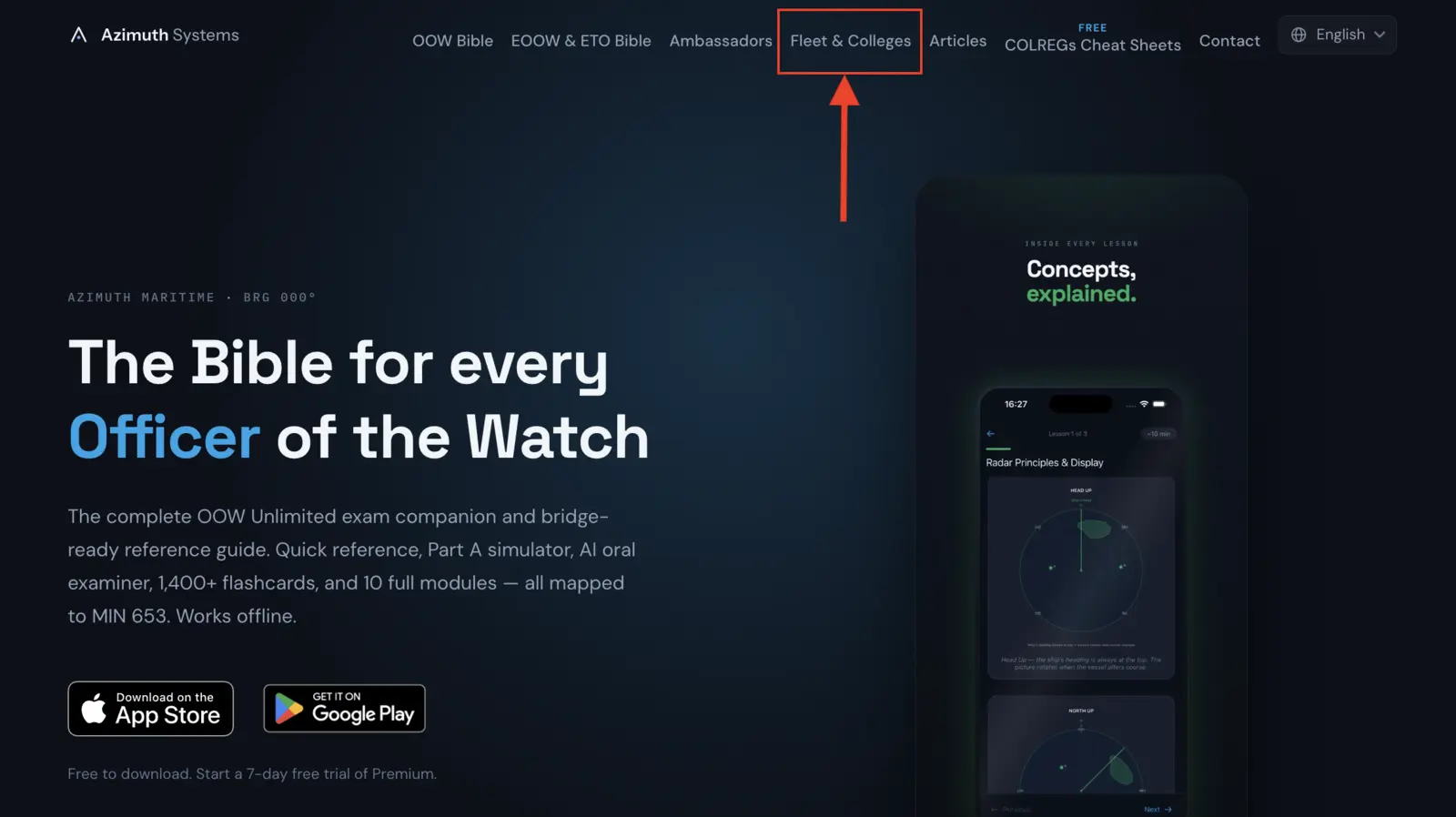
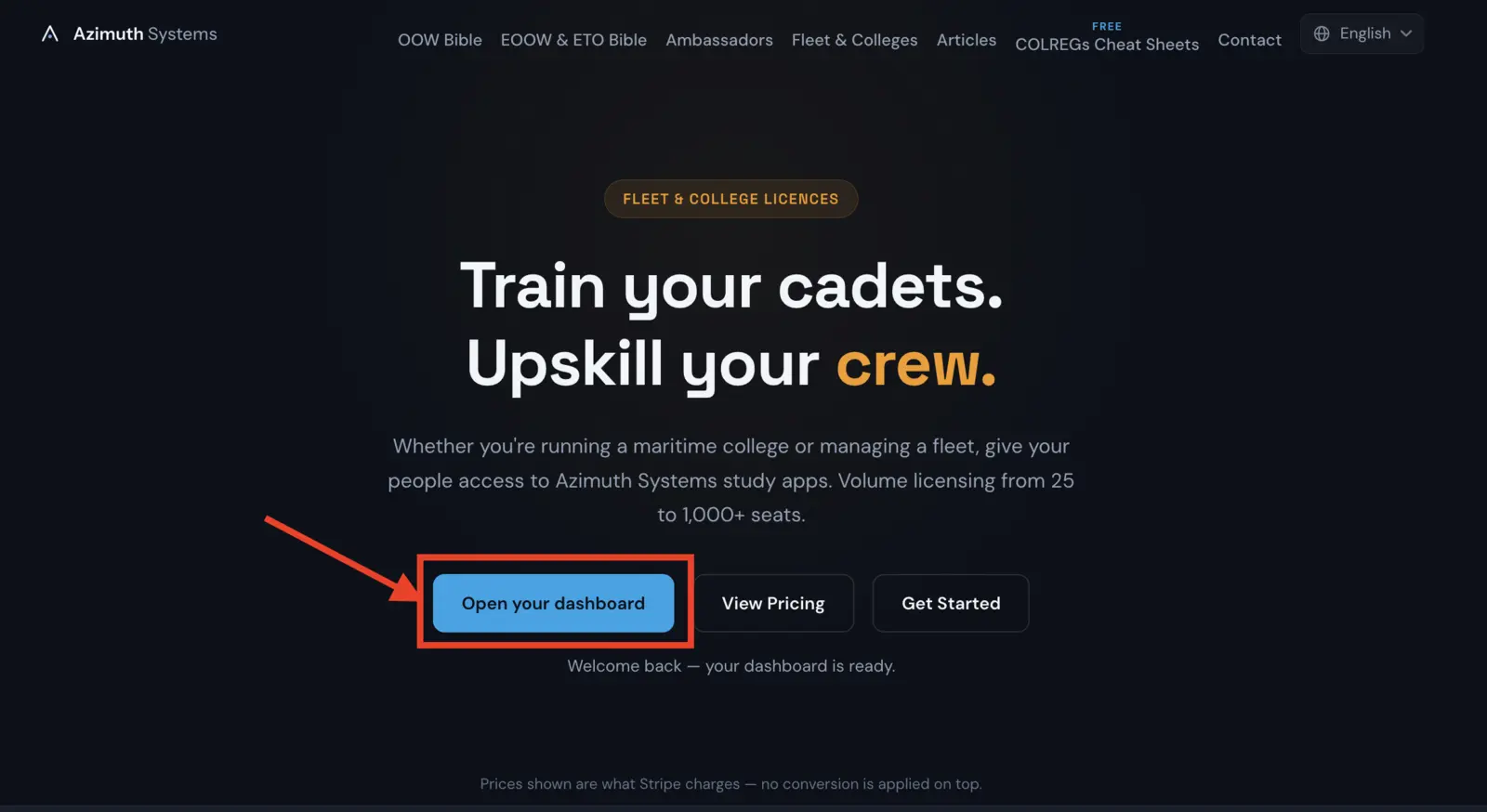
Click it and you land on /fleet, written for a completely different reader: someone buying on behalf of other people. The trust row under the hero answers the four questions a training manager asks first — two specialist apps, mapped to the MCA syllabus, fully offline capable, with an AI oral examiner.
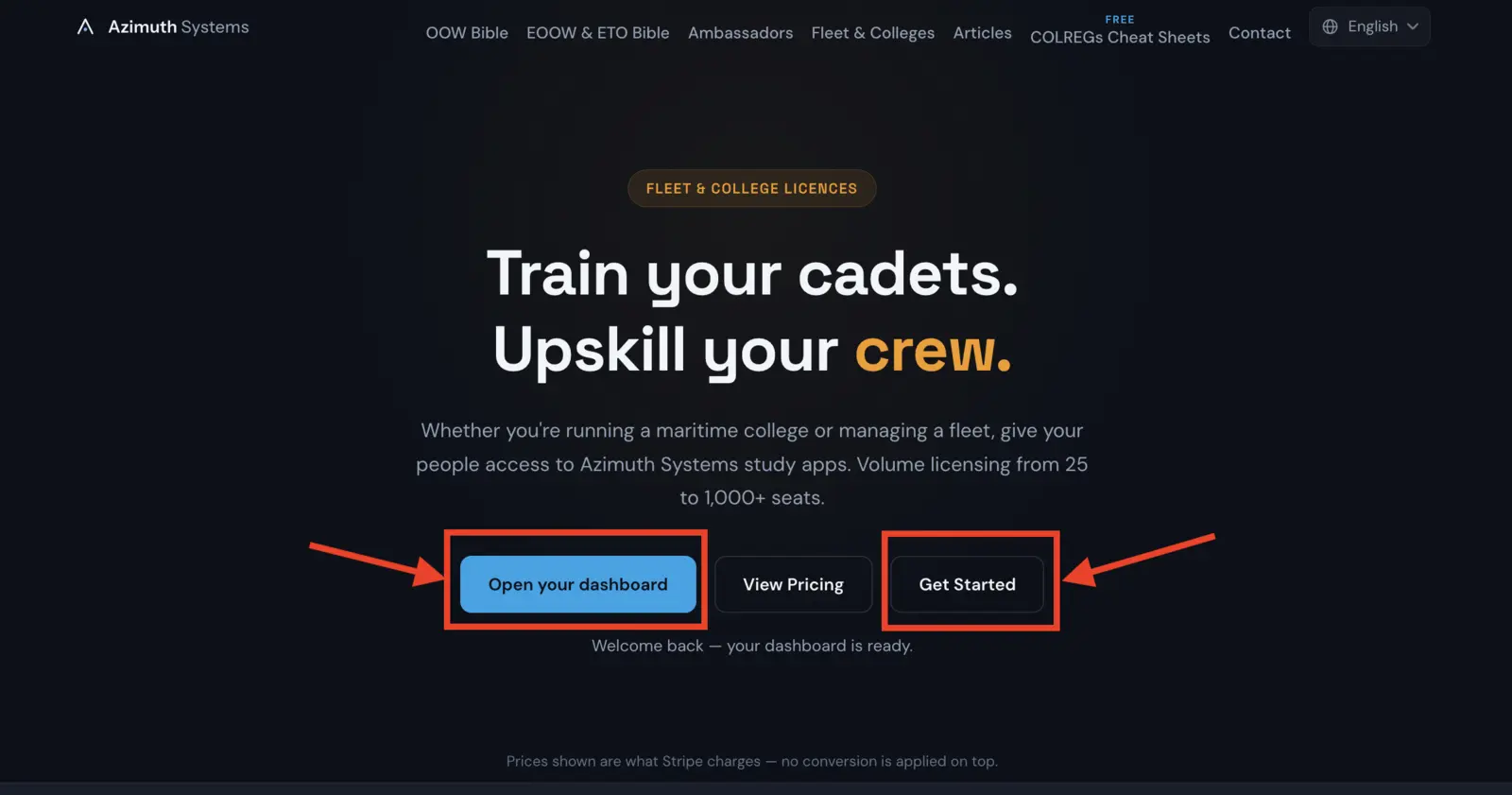
One quiet touch worth knowing about: if you have signed into the dashboard from that browser before, the page reorders itself and puts Open your dashboard first. Returning customers manage seats far more often than anyone buys them, and they were the ones having to hunt.
Step 2Price it yourself, with both apps in one order
Three licence tiers sit on the marketing page rather than behind a “request a quote” form. This is deliberate. Anyone comparing suppliers should be able to get to a number without giving out their phone number.
| Combined seats | Per seat / month | Per seat / year | EUR & USD / month |
|---|---|---|---|
| 25–49 | £3.50 | £42.00 | €4.19 · $4.59 |
| 50–99 | £2.75 | £33.00 | €3.29 · $3.59 |
| 100+ | £2.00 | £24.00 | €2.39 · $2.59 |
Here is the thing that makes this different from a single-app licence, and the one genuinely confusing part of buying two products at once:
Your combined seat total across both apps sets the per-seat rate.
A college buying 60 seats of The OOW Bible and 40 of The EOOW & ETO Bible has a combined total of 100 — so every seat, deck and engineering alike, bills at the 100+ rate of £2.00. Not two separate mid-tier rates. One order, one subscription, one invoice, one rate.
The consequence is worth reading rather than dismissing. Because a new rate applies to the whole order, crossing a band can make a larger order cheaper in total than a smaller one. 40 seats at £3.50 is £140.00 a month. 50 seats at £2.75 is £137.50. Ten more seats, and the bill goes down. The signup page tells you when that is true — and only when it is actually true, because it is a claim any buyer can check with a calculator.
Annual billing is the same rate paid twelve months up front, not a discount. That is stated plainly rather than dressed up: one invoice instead of twelve, which for a college finance office is often the whole point.
Step 3Set up the account and pay
Get Started carries your chosen tier through to /fleet/signup, so nothing needs re-entering.
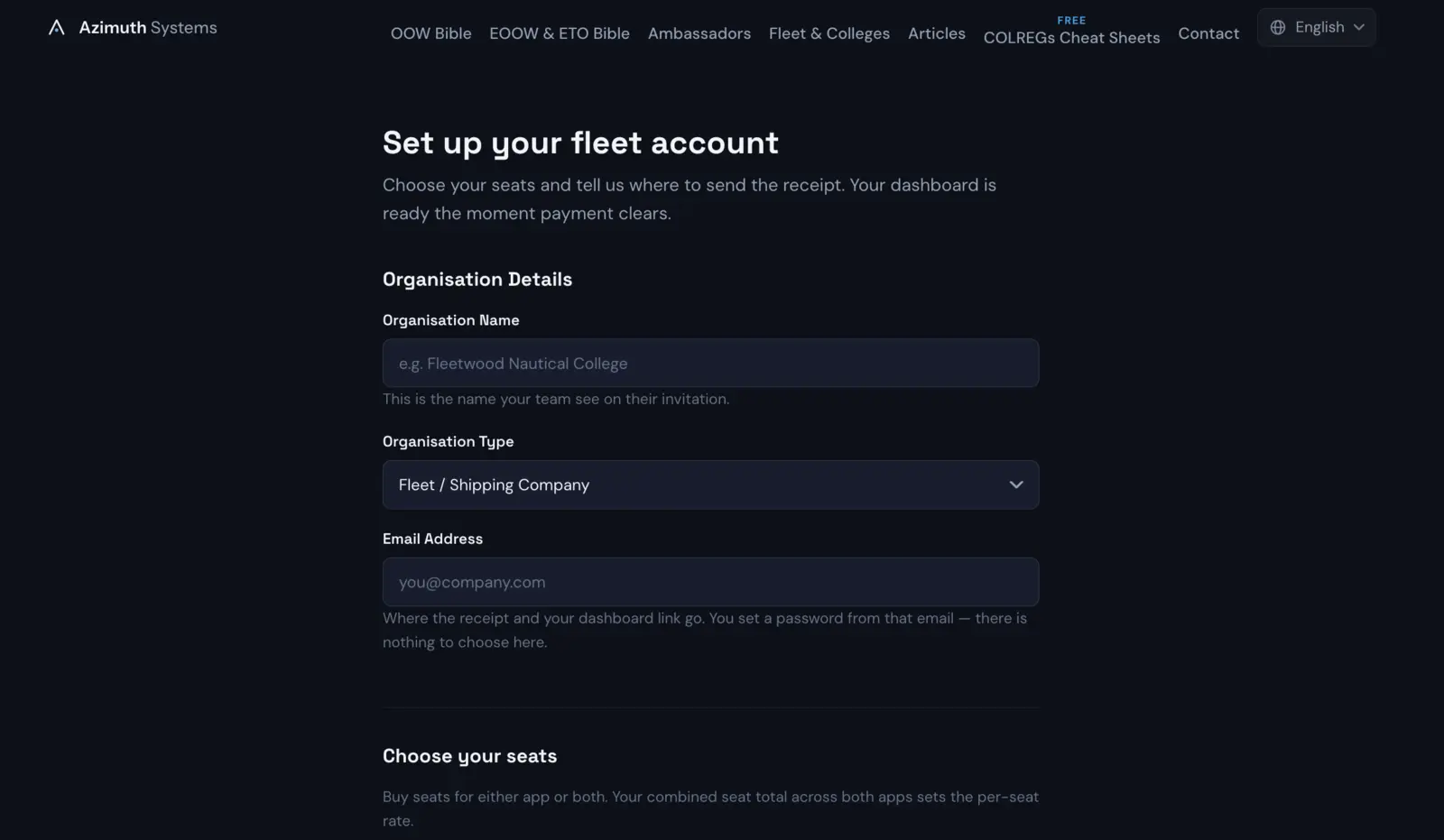
There are three things to tell us:
- Organisation name. Worth getting right first time — this is the name your cadets and crew see on their invitation email.
- Organisation type. Fleet / shipping company, maritime college / training centre, or enterprise / other. It shapes nothing about your account; it just tells us who is actually buying.
- Your email. Where the receipt and the dashboard link go, and the address that becomes the admin account.
Then the seats. Two boxes, one per app. Put zero in either if you only want one of them — a college running deck cadets only can leave the engineering box empty, and vice versa. The minimum is 25 seats in total across both.
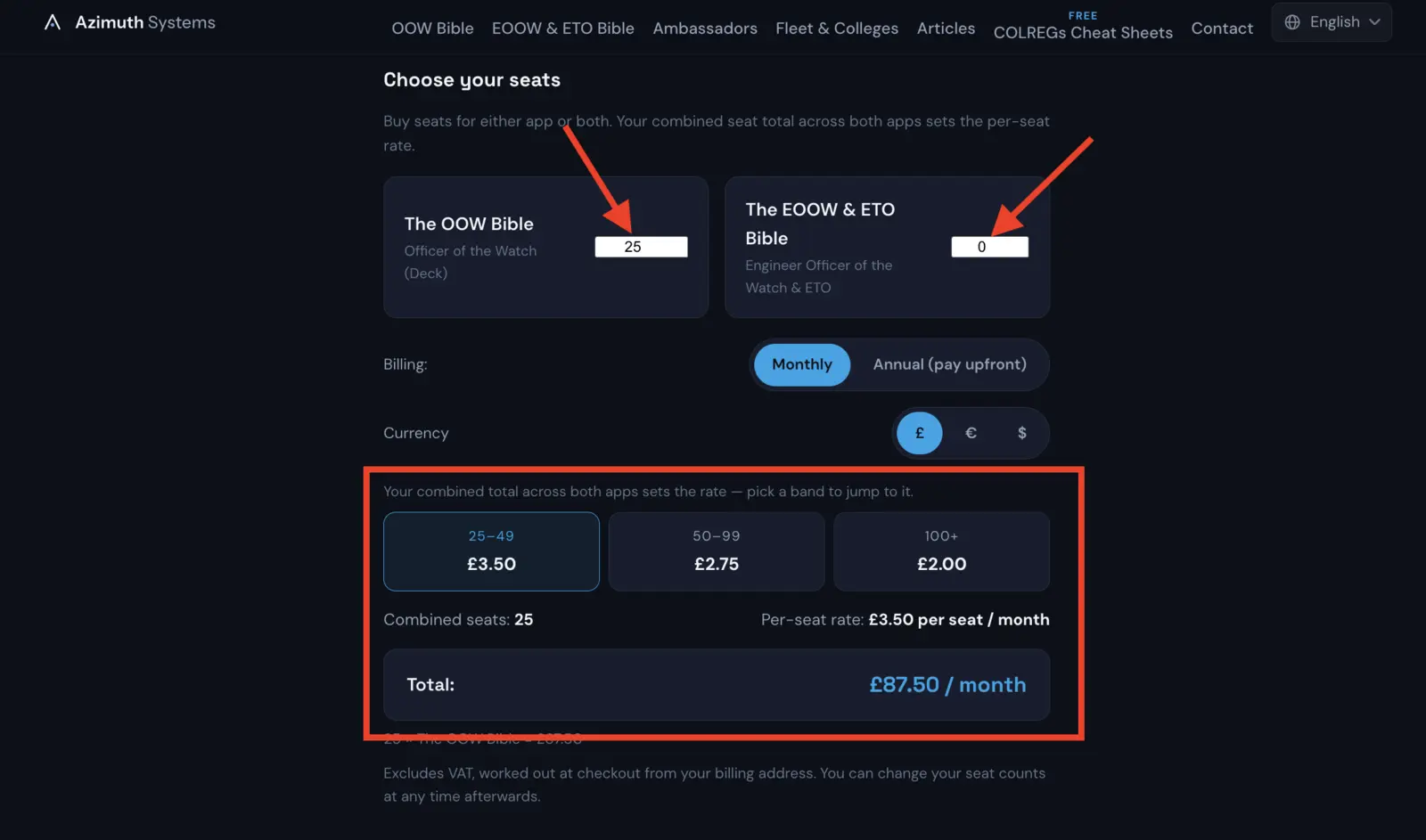
Underneath, three controls that all update the price live: monthly or annual, currency (GBP, EUR or USD), and the three volume bands — each of which is a real button. Click 50–99 and the form tops your order up to 50 seats so you can see what that actually costs. It adds them to whichever app already has more, so your deck/engineering split survives the click.
The line under the total breaks the order down per app rather than making you do the arithmetic yourself: 60 × The OOW Bible = £120.00 · 40 × The EOOW & ETO Bible = £80.00.
Then Continue to Payment hands over to Stripe Checkout. Card details are entered on Stripe's page, not on ours, and Azimuth Systems never sees them.
The one thing that surprises people: there is no password field
This is worth understanding rather than working around. You do not choose a password at checkout. Your account is created after payment clears, and you claim it from a link emailed to the address you entered.
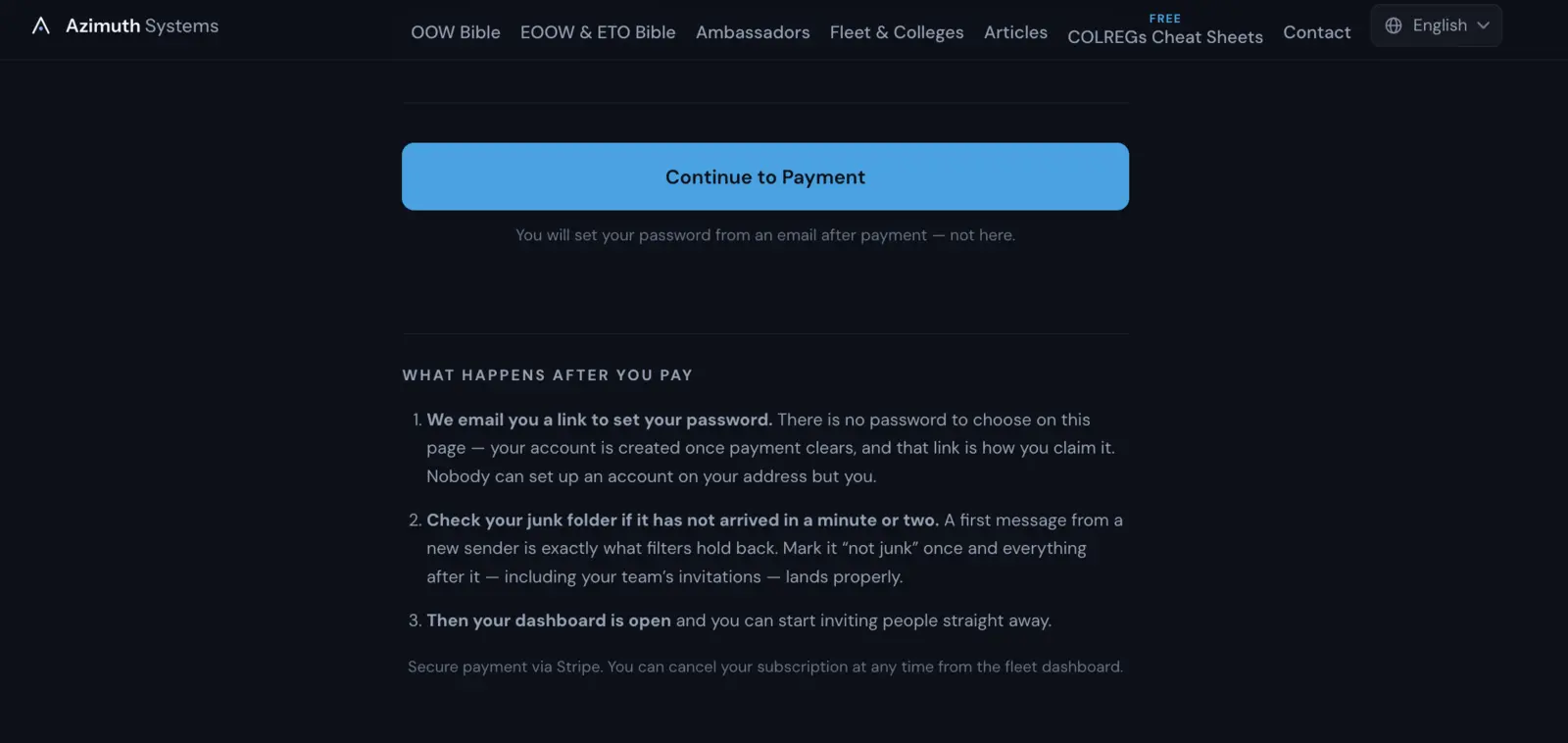
The reason is straightforward: nobody can create an account on your address but you. It also means an abandoned checkout leaves no half-built account behind, and a buyer whose card was declined can simply try again instead of hitting a form that appears to have reset itself.
The trade-off is that one email now stands between you and your dashboard — which is exactly why the page tells you, twice, to check your junk folder.
Do the junk-folder check properly, once. A first message from a sender your mail server has never seen is precisely what spam filters hold back. Mark it “not junk” and every message after it lands properly — including your cadets' invitations. An unopened invitation sitting in a spam folder is the single most common reason a paid seat goes unused.
If the link expires before you use it, “Forgot password” on the dashboard with the same address does the same job.
Step 4Your dashboard, and what the gauges mean
Set your password and the dashboard opens at azimuthsystemsltd.com/fleet/dashboard.
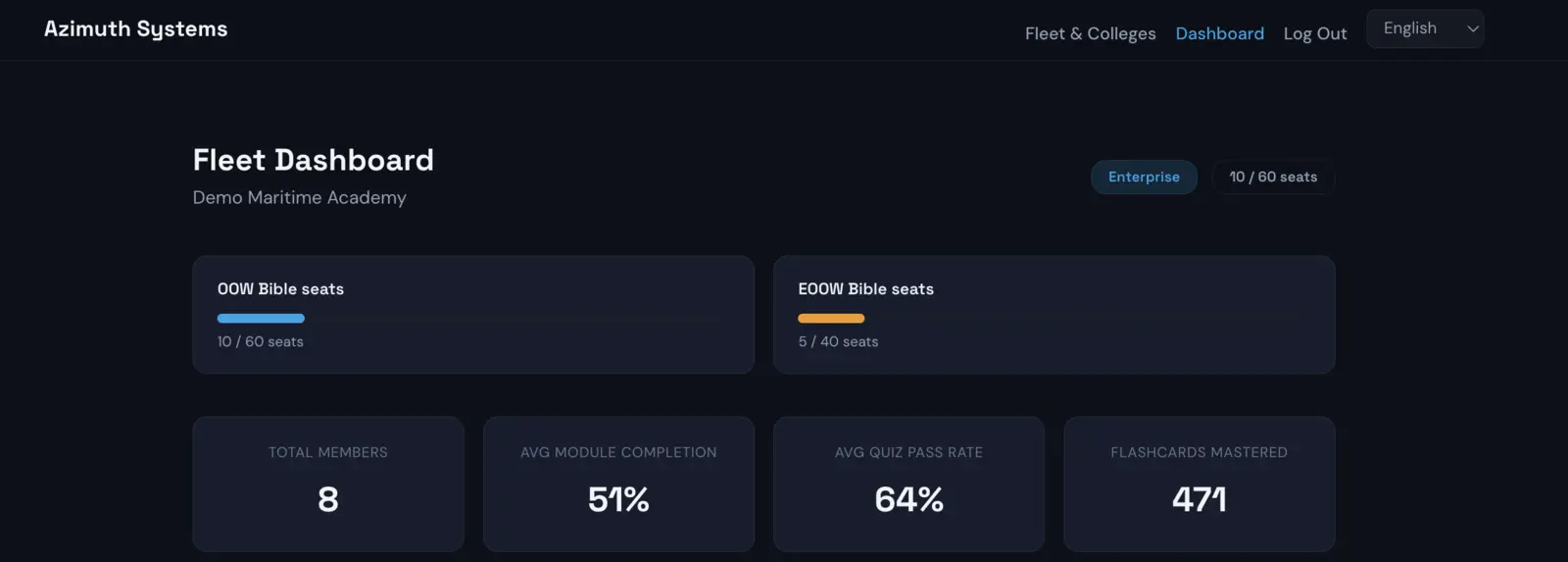
The seat gauges are the headline: how many of each pool are in use and how many are free. A seat counts as used whether it has been claimed by someone with an account or is reserved by an invitation that has not been taken up yet. Those are different situations, and the dashboard keeps them apart further down — but for the purposes of “can I invite another twelve people”, a pending invitation is a spent seat.
Below the gauges, four figures roll your whole organisation up:
| Total Members | How many seats are actually held by a person. |
|---|---|
| Avg Module Completion | How far through the syllabus the group is, on average. |
| Avg Quiz Pass Rate | How they are performing, not just how much they have touched. |
| Flashcards Mastered | The spaced-repetition figure — the best single proxy for whether someone is revising or cramming. |
Step 5Add your cadets and crew
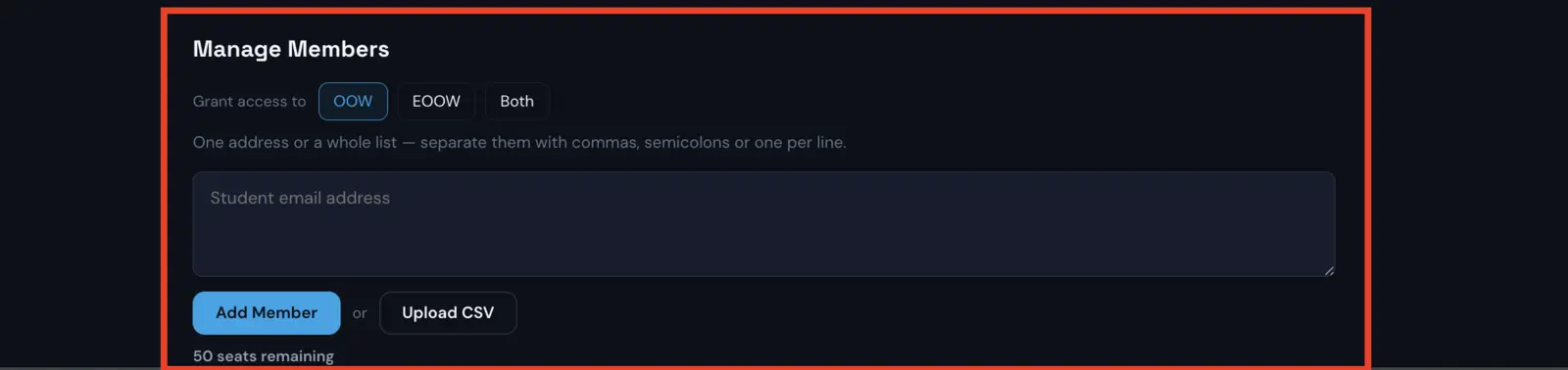
Manage Members takes one address or a whole list. Commas, semicolons or one per line, so you can paste a column straight out of a crew list or a student record system without reformatting it.
If your organisation holds seats in both apps, a Grant access to selector appears: OOW, EOOW, or Both. Deck cadets get the deck app, engineering cadets get the engineering app, and a dual-ticket officer can have both — with each grant counting against its own pool.
Upload CSV is there for an intake rather than a joiner. Pick the file and you get a preview before anything happens: every row listed, each marked Ready, Invalid email or Duplicate, with a count of each. You confirm, and only the valid ones go through. Nothing is added on the strength of a file you have not seen parsed.
There is nothing for the recipient to redeem. No code, no coupon, no support ticket:
- If they already have an account, the seat goes live immediately and they appear in the members list straight away.
- If they do not, the invitation reserves the seat and it activates the moment they sign up with that address.
Either way, the next time they open the app, premium is simply on.
Each invitation is a branded email from Azimuth Systems, subject-lined with your organisation's name, carrying the App Store and Google Play links for whichever app or apps that person has been given.
Pending Invites
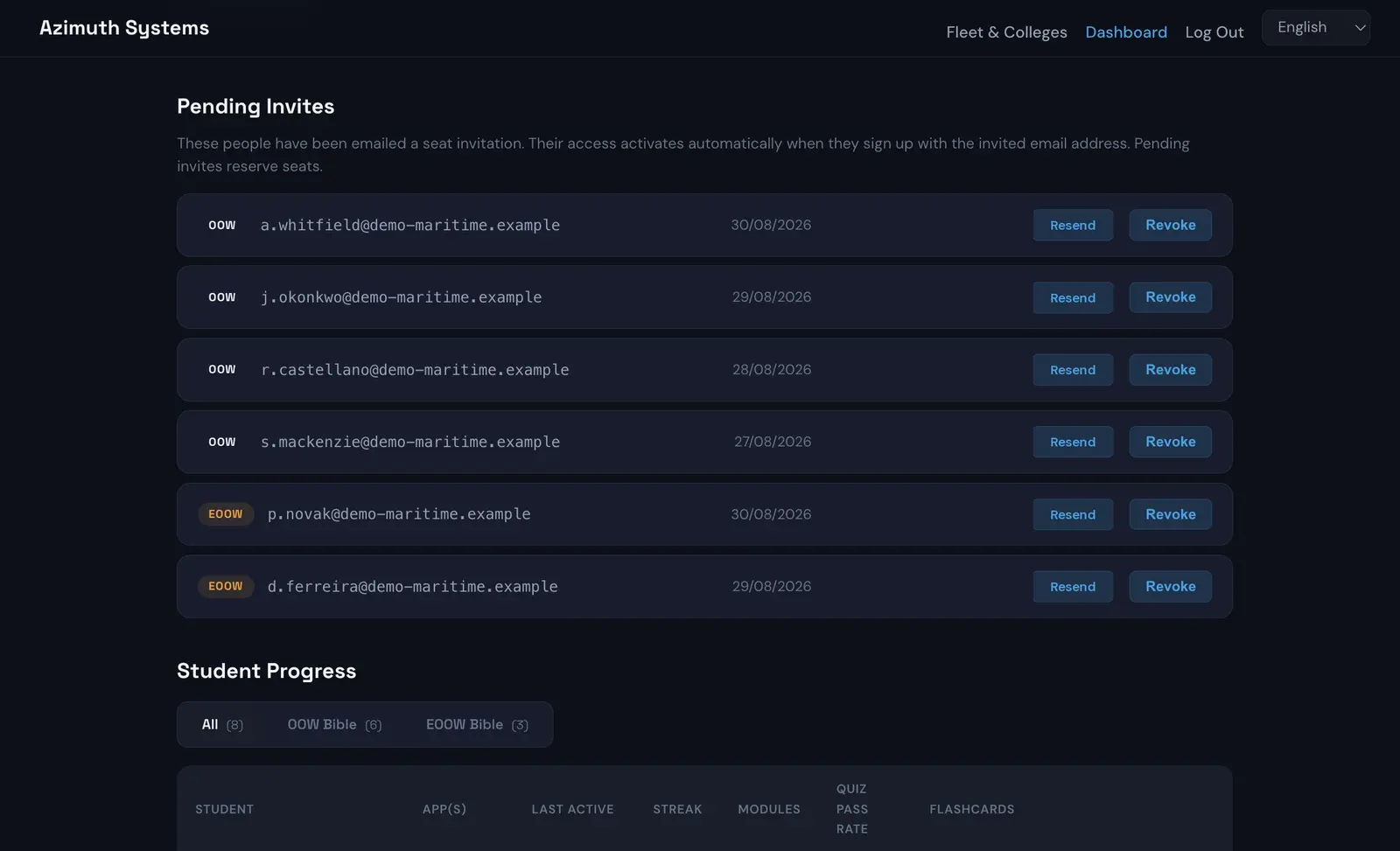
Pending Invites lists everyone who has been emailed but has not signed up yet. Resend chases one that never arrived. Revoke cancels it and frees the seat immediately.
Two limits exist and are worth knowing before they surprise you: Resend has a five-minute cooldown on any one invitation, and an organisation can send 300 invitation emails in a rolling 24 hours. Neither bites a normal intake. If you are onboarding a very large cohort in one sitting and hit the cap, every seat is still reserved — only the mail is deferred, and Resend picks it up the next day.
Step 6Change your seat count, and reach your invoices
Seats & billing sits below the invitations, and it is the panel that makes this a self-service product rather than a support queue.
Change either pool and the quote updates as you type — the combined total, the per-seat rate it lands on, and what the whole bill becomes. Underneath, the line that matters: how the new total compares with what you pay now. The quote is computed by the server from the same price map it charges from, so it is not an estimate.
That comparison is worth reading rather than skipping, because it is frequently counter-intuitive. Crossing a band re-rates every seat, not just the new ones, so adding seats can reduce the bill. 40 seats at £3.50 is £140.00 a month; 50 at £2.75 is £137.50. The panel says so in cash — “£2.50 less than you pay now” — because that is a claim you can check.
Three things the panel will not let you do, all deliberate:
- Reduce a pool below the seats already in use. It names the app and the number, and asks you to remove people first. The alternative is an organisation holding seats it is not paying for, with no rule anywhere deciding whose access ends — that choice is yours and it should be explicit.
- Drop below 25 seats combined. That is the order minimum, and it does not stop applying after you have bought.
- Add a pool you cannot fill. Adding EOOW seats to an account that has never had them sets up the engineering side of your account first, and if that cannot be done, nothing is charged.
Changes are prorated to the day. Seats added mid-period are charged for the part of the period they exist; seats released leave a credit. You are neither double-charged for growing mid-month nor left paying for seats you have given up.
Invoices, card & cancellation opens the Stripe billing portal, where every itemised invoice can be downloaded, the card can be changed, and the subscription can be cancelled — without emailing anyone.
That last point is the difference between a product and a contract. You never need permission to change your own seat count.
Step 7See who is actually ready
This is the panel that justifies the purchase, and it is the one people buying subscriptions individually can never give you.
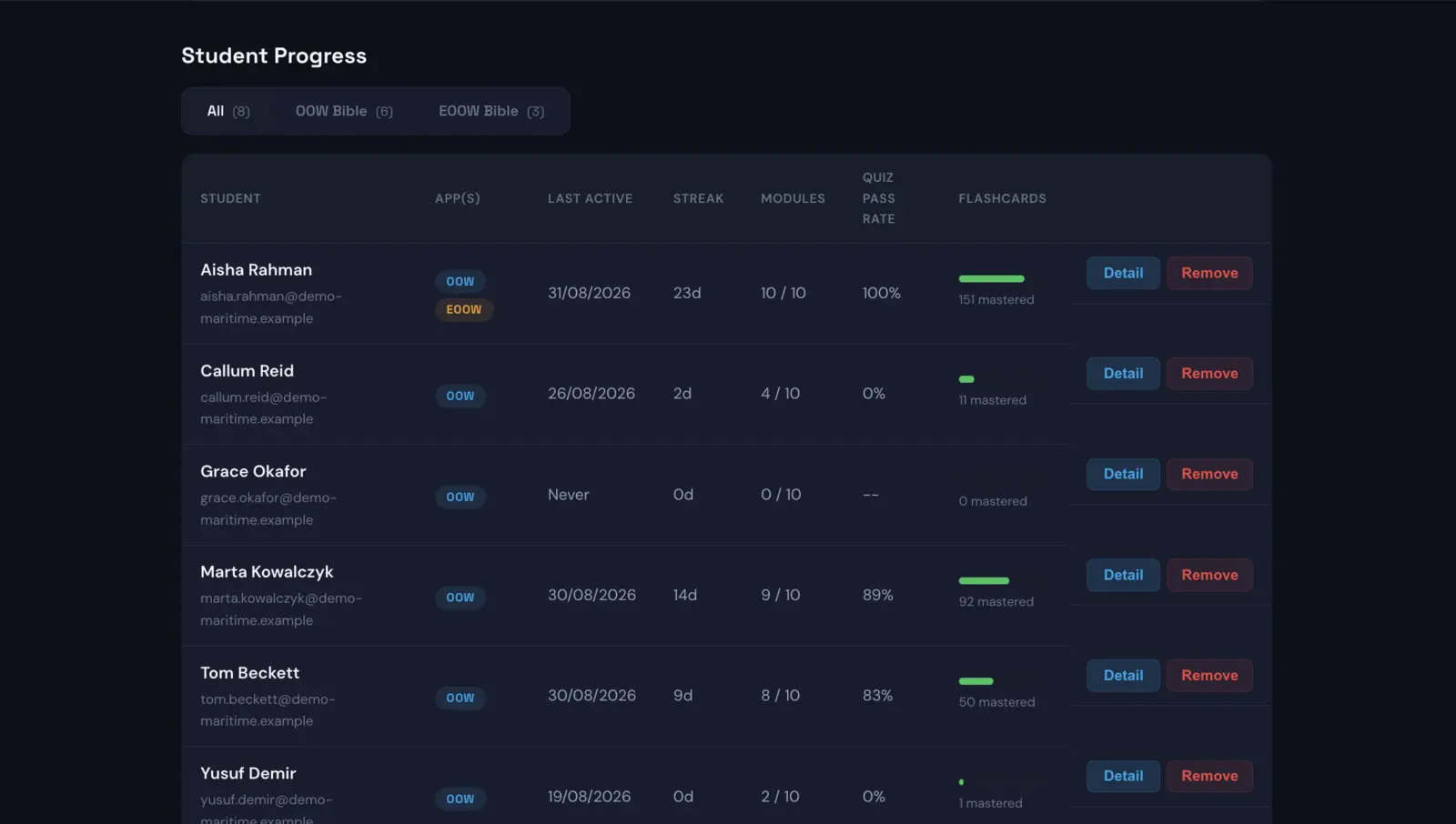
Student Progress lists each person with:
- App(s) — which licence or licences they hold
- Last Active — or Never, which is a different problem from a low score
- Streak — consecutive days of practice
- Modules — how many of the syllabus modules they have started
- Quiz Pass Rate
- Flashcards mastered
The All / OOW Bible / EOOW Bible tabs filter the list and carry counts, which is the fastest way to answer “is anyone actually using the engineering seats we bought”.
Two states look similar in a progress bar and are kept deliberately distinct here:
- Last Active: Never — the seat is held but the app has not been opened. This is a chasing problem, and often a junk-folder problem.
- Active, low numbers — they are in and they are not revising. That is a different conversation entirely.
Detail opens one person's full picture: module-by-module progress across the syllabus, quiz performance (attempts, average score, pass rate), and flashcard mastery split into mastered, learning and new — which is the difference between someone who has seen the material and someone who has retained it.
Remove takes the seat back. Their premium access from your organisation is revoked and the seat is free immediately, ready for whoever replaces them.
What you can see, and what you deliberately cannot
You see
Module and lesson completion, quiz attempts and scores, flashcard mastery, practice streak and last-active date.
You never see
Their individual answers, their AI Oral Examiner sessions or transcripts, their exam recordings, or anything they do outside the app.
The oral examiner is left out on purpose. The app promises the candidate that a mock oral is theirs — and a mock exam someone is afraid to fail is worth nothing to anybody, least of all the employer paying for it. The point of a practice viva is that it is the safe place to be bad at something.
After you have bought: the questions that come up
What happens when a cadet finishes, or an officer leaves?
Remove them and the seat is free immediately. Give it to their replacement or the next intake. A seat belongs to the organisation, not to a person.
Can we mix deck and engineering seats?
That is the design. One order, one subscription, one invoice, and your combined total across both apps sets the rate for every seat.
What if someone already pays for the app themselves?
Invite them anyway. An organisation seat sits alongside a personal subscription rather than replacing it, and they can cancel their own whenever they like.
Can we add seats later?
At any time, from the dashboard, prorated to the day — and the rate drops for every seat the moment your combined total crosses a band. Reducing works the same way, once you have removed enough people to free the seats.
How are we invoiced?
By card through Stripe, monthly or annually, with a proper itemised invoice for every payment, in GBP, EUR or USD. Every invoice is downloadable from the billing portal in the dashboard.
Can we cancel?
Monthly plans can be cancelled at any time, from the billing portal in your dashboard. Annual plans run the full twelve-month term. People keep access to the end of the billing period.
We cancelled and want to come back.
Sign in to the dashboard with the same address. A cancelled organisation gets a Reactivate subscription button that restarts it with the same seats and keeps your members, their progress and every pending invitation intact. Nothing is deleted when a subscription lapses.
Do our people need an account before we can invite them?
No. Invite any address. If they have an account the seat is live at once; if not, it waits for them.
What the seat actually unlocks
Worth stating, because a seat is only worth what it opens.
- The OOW Bible — ten modules mapped to the MCA's published syllabus (MIN 653 Amendment 1 / STCW A-II/1): Navigation, COLREGs & Buoyage, Radar & ARPA, Meteorology, Watchkeeping & BRM, Ship Stability, Cargo Operations, Safety & Legislation, Emergency Response and Ship Handling.
- The EOOW & ETO Bible — twelve modules mapped to STCW A-III/1 and A-III/6: Marine Diesel Engines, Marine Boilers & Steam Systems, Auxiliary Machinery, Marine Electrical Systems, Automation & Control, Refrigeration & Air Conditioning, Naval Architecture & Stability, Safety Systems & Firefighting, Environmental Compliance (MARPOL), Watchkeeping & ER Management, High Voltage Systems, and Electronics, PLCs & Navigation Systems.
Both apps include:
- Spaced-repetition flashcards, so revision schedules itself around a watch rota or a college timetable rather than collapsing the week before.
- The Part A exam simulator — fifteen questions, four test points each, a forty-minute timer, all five question types, and per-topic thresholds that flag a weak area before an examiner does.
- The AI Oral Examiner — a spoken mock viva that asks, presses for detail where an answer is thin, and returns a written report: verdict, score out of 100, three graded competencies and the points hit and missed. A seat includes three sessions a month. This is the flagship, and it is the one thing a candidate cannot get from a textbook, a flashcard deck or a night alone in a cabin at 0200.
- Offline quick reference — lights and shapes, IALA buoyage, sound and distress signals, flags. Everything except the AI examiner works in airplane mode, which is the only specification that matters mid-ocean.
- Eleven languages, which matters more to a mixed-nationality fleet than to a UK college.
Start here
The whole journey — header link, seat counts, checkout, password email, first invitations — takes about four minutes. There is no call to book and no quote to wait for.
Questions first? info@azimuthsystemsltd.com — a person answers.