In short: HELM is a study, revision and reference app for the MCA Officer of the Watch (Yachts <3000 GT) oral examination. Crew seats are the business version: you buy a pool of seats from the website, invite crew by email address, and each seat unlocks the full app — including the AI oral examiner — for whoever holds it. Seats belong to the company, not the person, so when someone leaves you reassign the seat instead of buying another. From £19.99 per seat per year at scale, minimum ten seats, no setup fee, no VAT. This guide walks the whole journey, screen by screen.
Key facts
| Product | HELM: OOW Yachts — MCA OOW (Yachts) <3000gt study and reference app |
|---|---|
| Publisher | Azimuth Systems Ltd (UK) |
| What a seat is | One full premium licence, held by the company, assigned to a crew email address |
| Minimum order | 10 seats |
| Price range | £3.25 down to £2.15 per seat per month · £30.99 down to £19.99 per seat per year |
| VAT | None. Azimuth Systems Ltd is not currently VAT-registered, so no VAT is charged and none appears on your invoice |
| Billing | Card, monthly or annual, through Stripe. Itemised invoices, card changes and cancellation are self-service |
| Setup time | Minutes. No call, no quote, no minimum term |
| Where it starts | azimuthsystemsltd.com/helm/crew |
Why a crew manager would buy seats rather than expensing subscriptions
Most crew management companies already pay for OOW preparation, just untidily. A deckhand asks for a study app, someone approves £39.99 on a card, it lands as a line on an expense claim, and nobody can say six months later whether the person ever opened it. Multiply that by a fleet and you have a training spend with no owner, no renewal date and no evidence.
A seat pool changes three things, and they are the three things that matter to whoever signs the invoice:
- One invoice, however many crew. Not eleven receipts from eleven personal cards.
- The seat outlives the person. A deckhand who moves to another company takes their career with them, not your licence. Remove them in the dashboard and the seat is free that second, ready for whoever replaces them.
- You can see readiness before the exam, not after. This is the part that does not exist if crew buy individually. The dashboard shows how ready each person is for the oral — modules completed, mock exam scores, practice streak, and the exam date they have set themselves — so the conversation about whether someone is ready to be put in front of an examiner is based on something other than their own optimism.
What follows is the whole journey, in order.
Step 1Find it: “Crew seats” in the header
Everything starts on the HELM product page. The header carries a Crew seats link, sitting between the consumer navigation and the Get HELM button.
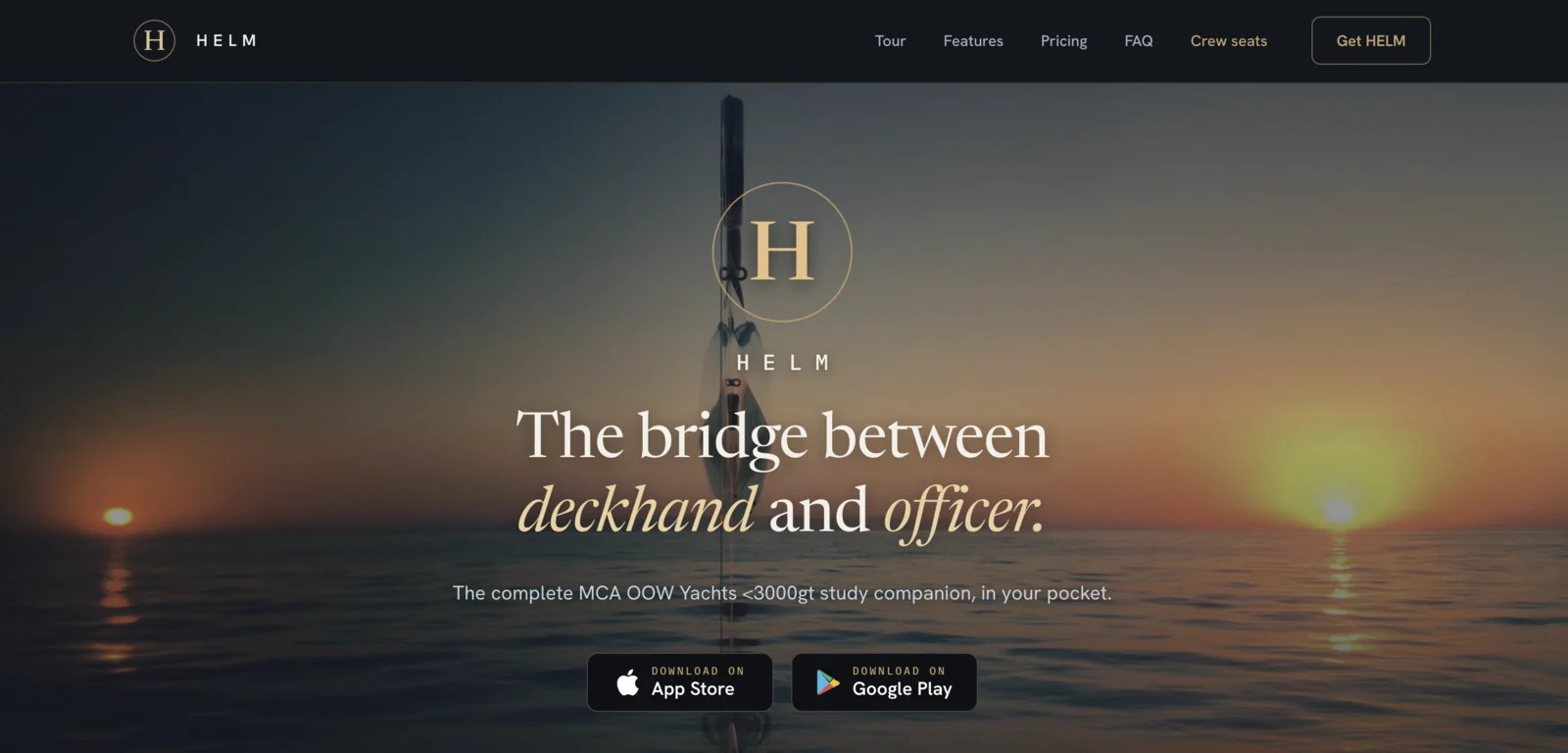
Click it and you land on /helm/crew, which is written for a completely different reader: someone buying on behalf of other people. The hero states the trade plainly — buy a pool of HELM seats, hand them out by email, and see who is genuinely ready before they sit it — and the trust row underneath answers the four questions a crew manager asks first: 16 MCA-mapped modules, an AI oral examiner that marks, offline operation at sea, and one invoice however many crew.
You can also go straight there: www.azimuthsystemsltd.com/helm/crew.
Step 2Price it yourself with the calculator
The pricing calculator sits on the marketing page itself rather than behind a “request a quote” form. This is deliberate. A crew manager comparing suppliers should be able to get to a number without giving anyone their phone number.
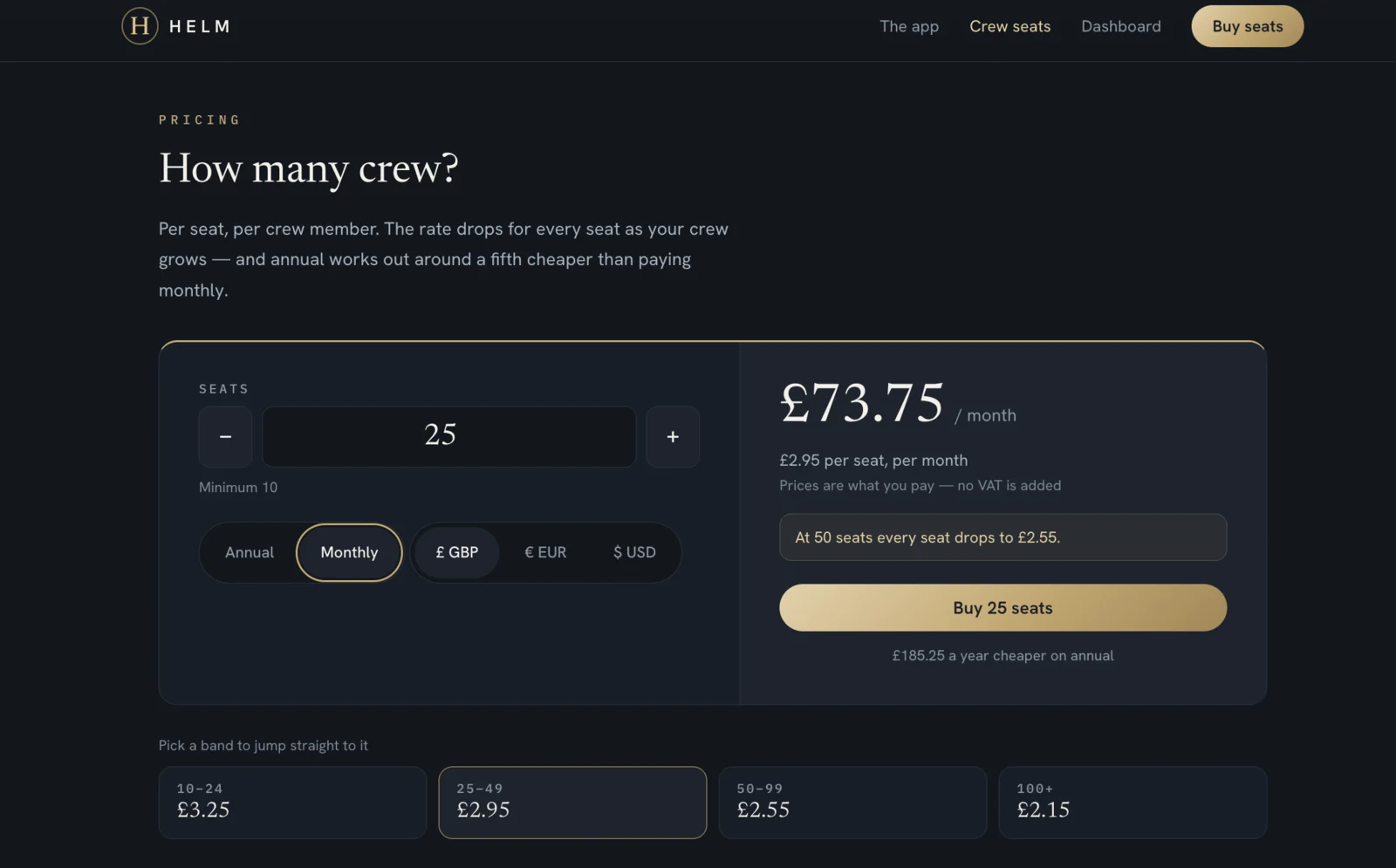
Four controls, and they all update the price live:
- Seat count. Steppers or type the number directly. The minimum is ten.
- Annual or monthly. Annual works out roughly a fifth cheaper. The calculator shows the saving in cash rather than as a percentage — at 25 seats it reads “Saves £185.25 a year against monthly”, which is a more useful sentence than “save 21%”.
- Currency. GBP, EUR or USD for display. Billing is taken in the currency you select.
- The band cards. Four price bands are shown underneath, and each one is clickable — tap 50–99 and the calculator jumps straight to 50 seats so you can see what that order actually costs.
| Seats | Per seat, per month | Per seat, per year | Annual, per month equivalent |
|---|---|---|---|
| 10–24 | £3.25 | £30.99 | £2.58 |
| 25–49 | £2.95 | £27.99 | £2.33 |
| 50–99 | £2.55 | £23.99 | £2.00 |
| 100+ | £2.15 | £19.99 | £1.67 |
Figures in GBP, rendered from the same price ladder the calculator uses, so this table cannot go stale. EUR and USD rates are shown live in the calculator.
The calculator also nudges you when you are close to a threshold — “At 50 seats every seat drops to £23.99” — which is worth reading rather than dismissing. Because the new rate applies to the whole order, crossing a band can make a larger order cheaper in total than a smaller one. Going from 24 seats to 25 is the clearest example: 24 seats at £30.99 is £743.76 a year, and 25 seats at £27.99 is £699.75. One more seat, £44 less.
And the line underneath the total is not a footnote: prices are what you pay — no VAT is added. Azimuth Systems Ltd is not currently VAT-registered, so the number in the calculator is the number that leaves the account.
Step 3Set up the account and pay
Buy 25 seats carries your seat count, billing cycle and currency through to the checkout page. Nothing needs re-entering.
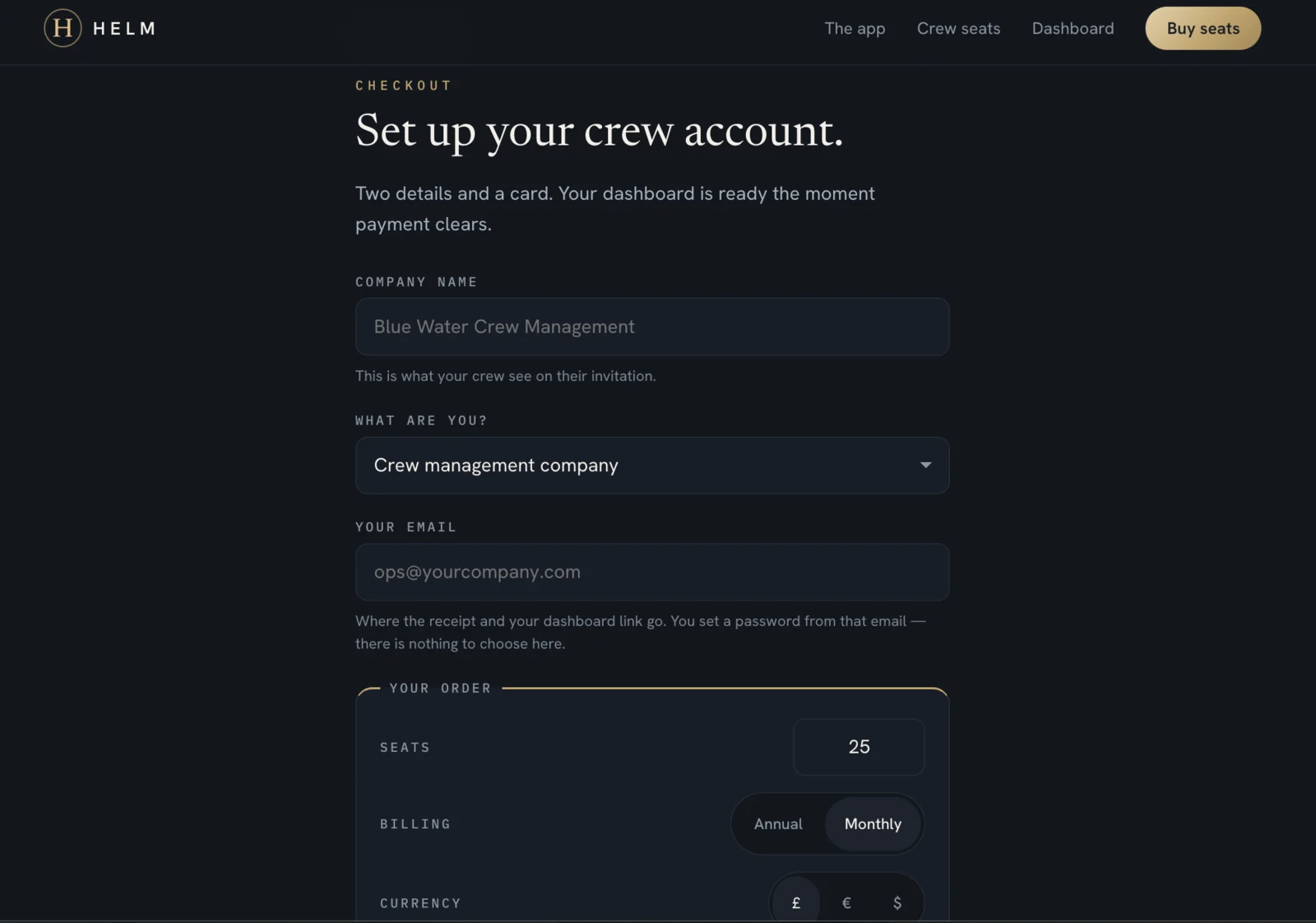
There are three things to fill in:
- Company name. Worth getting right first time — this is the name your crew see on their invitation.
- What are you? Crew management company, a yacht or owner, training academy, or something else. It shapes nothing about your account; it just tells Azimuth Systems who is actually buying.
- Your email. Where the receipt and the dashboard link go, and the address that becomes the manager account.
The order summary sits below, still editable — seats, billing cycle and currency can all be changed here without going back.
Then Continue to payment hands over to Stripe Checkout. Card details are entered on Stripe’s page, not on the HELM site, and Azimuth Systems never sees them.
The one thing that surprises people: there is no password field
This is worth understanding rather than working around. You do not choose a password at checkout. Your account is created after payment clears, and you claim it from a link emailed to the address you entered.
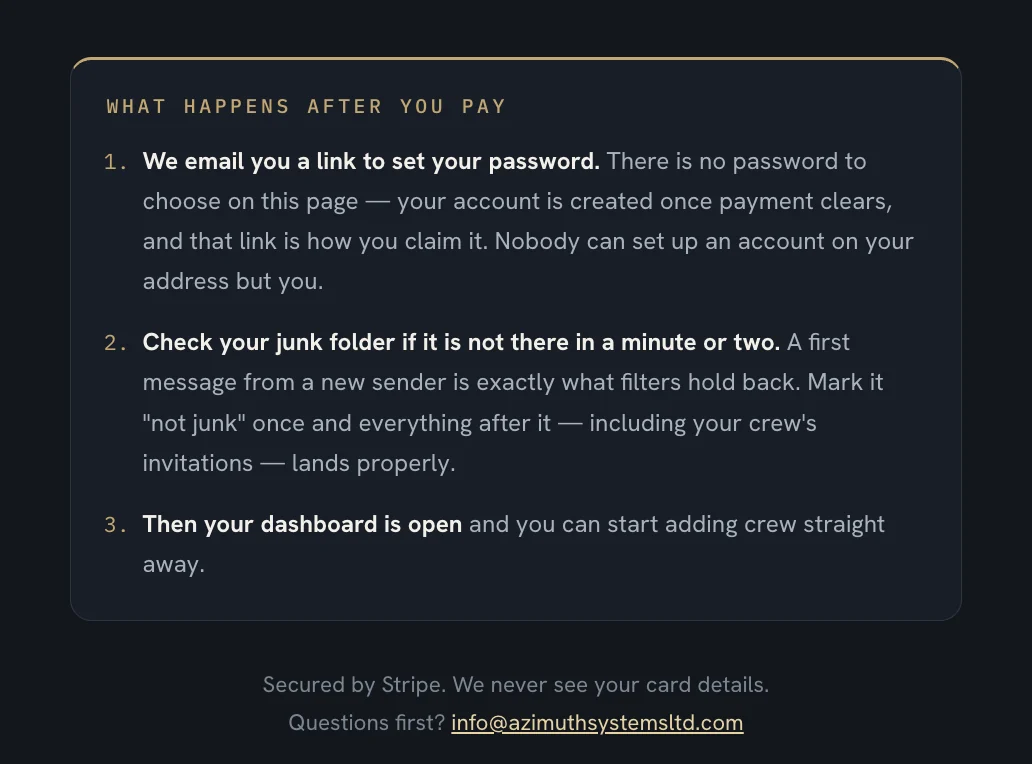
The reason is straightforward: nobody can create an account on your address but you. The trade-off is that one email now stands between you and your dashboard — which is exactly why the page tells you, twice, to check your junk folder.
Step 4Invite the crew
Set your password, and the dashboard opens.
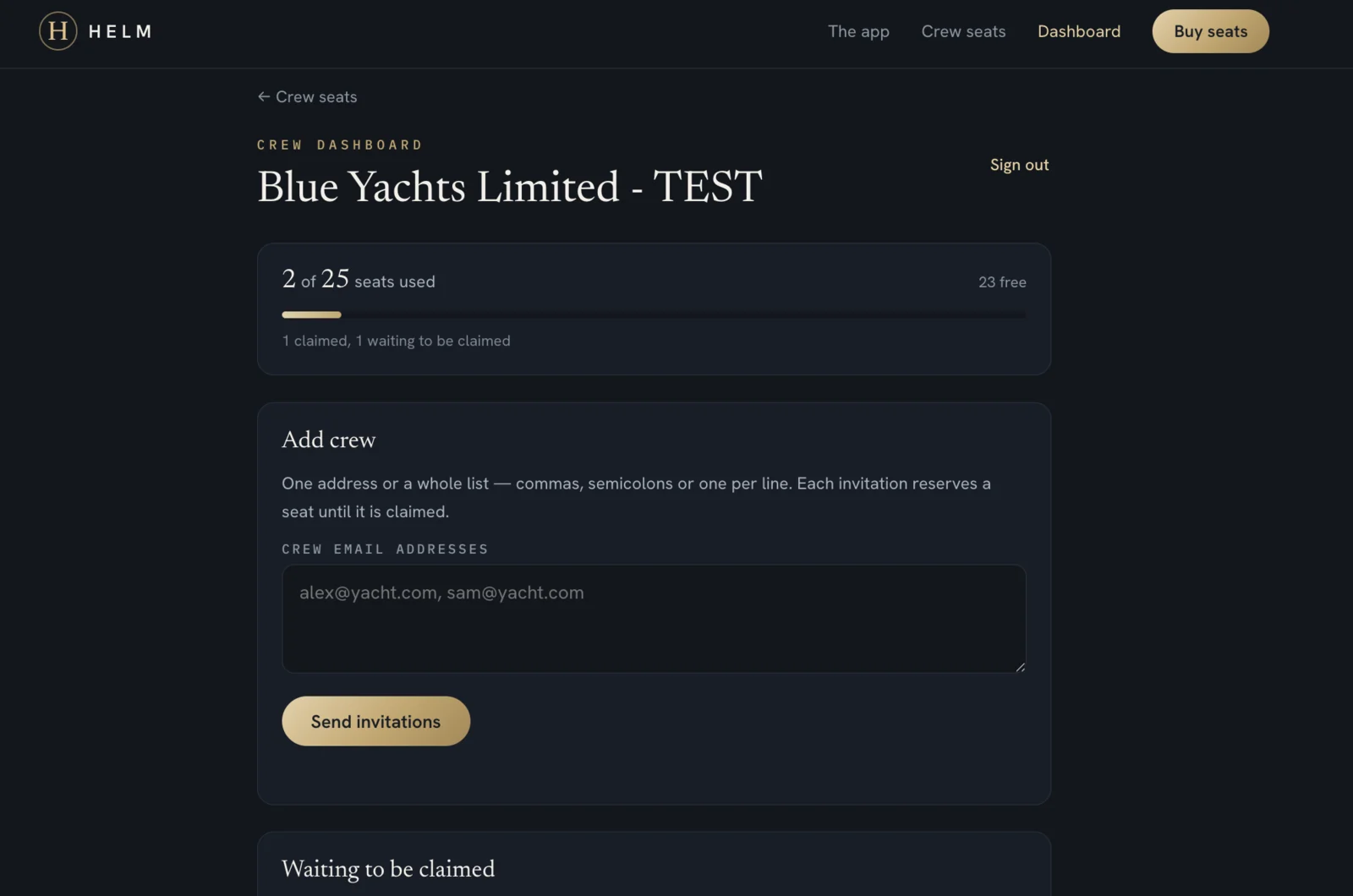
The seat gauge is the headline: how many of your seats are in use, how many are free, and — underneath — how many are claimed versus waiting. Those are different states and the dashboard keeps them apart on purpose.
Add crew takes one address or a whole list. Commas, semicolons or one per line, so you can paste a column straight out of a crew list or a spreadsheet without reformatting it. Each address gets a branded invitation carrying the App Store and Google Play links, and each invitation reserves a seat until it is claimed.
There is nothing for the crew member to redeem. No code, no coupon, no support ticket:
- If they already have a HELM account, the seat goes live immediately and they appear in Your crew straight away.
- If they do not, the seat waits for them and activates the moment they sign up with that address.
Either way, the next time they open the app, premium is simply on.
Step 5Manage seats, invitations and billing
Below the invite box sit the two panels you will actually live in.
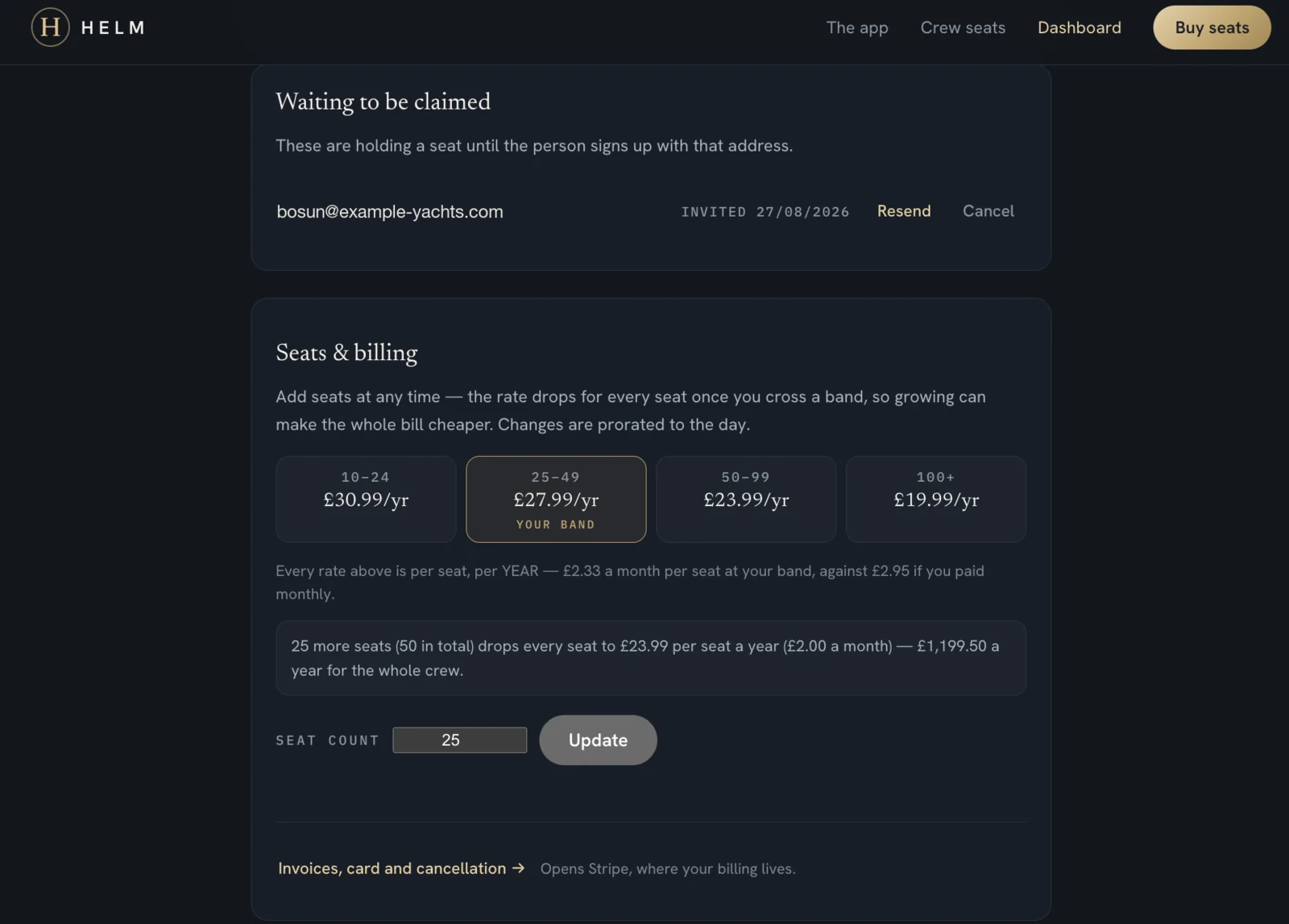
Waiting to be claimed lists every invitation that has gone out and not yet been taken up, with the date it was sent, a Resend button and a Cancel button. Cancel frees the seat immediately.
Seats & billing is the panel that makes this a self-service product rather than a support queue:
- The four bands are shown again with your band marked, and the line beneath translates the annual rate into a monthly one so you can compare like with like.
- A live prompt tells you what the next band would do to the whole bill — “25 more seats (50 in total) drops every seat to £23.99 per seat a year (£2.00 a month) — £1,199.50 a year for the whole crew.”
- Seat count plus Update changes your subscription there and then. Changes are prorated to the day, so you are neither double-charged for adding mid-cycle nor stuck paying for seats you have released.
- Invoices, card and cancellation opens the Stripe billing portal, where every itemised invoice can be downloaded, the card can be changed, and the subscription can be cancelled — without emailing anyone.
That last point is the difference between a product and a contract. You never need permission to change your own seat count.
Step 6See who is actually ready
This is the panel that justifies the purchase, and it is the one crew individually buying subscriptions can never give you.
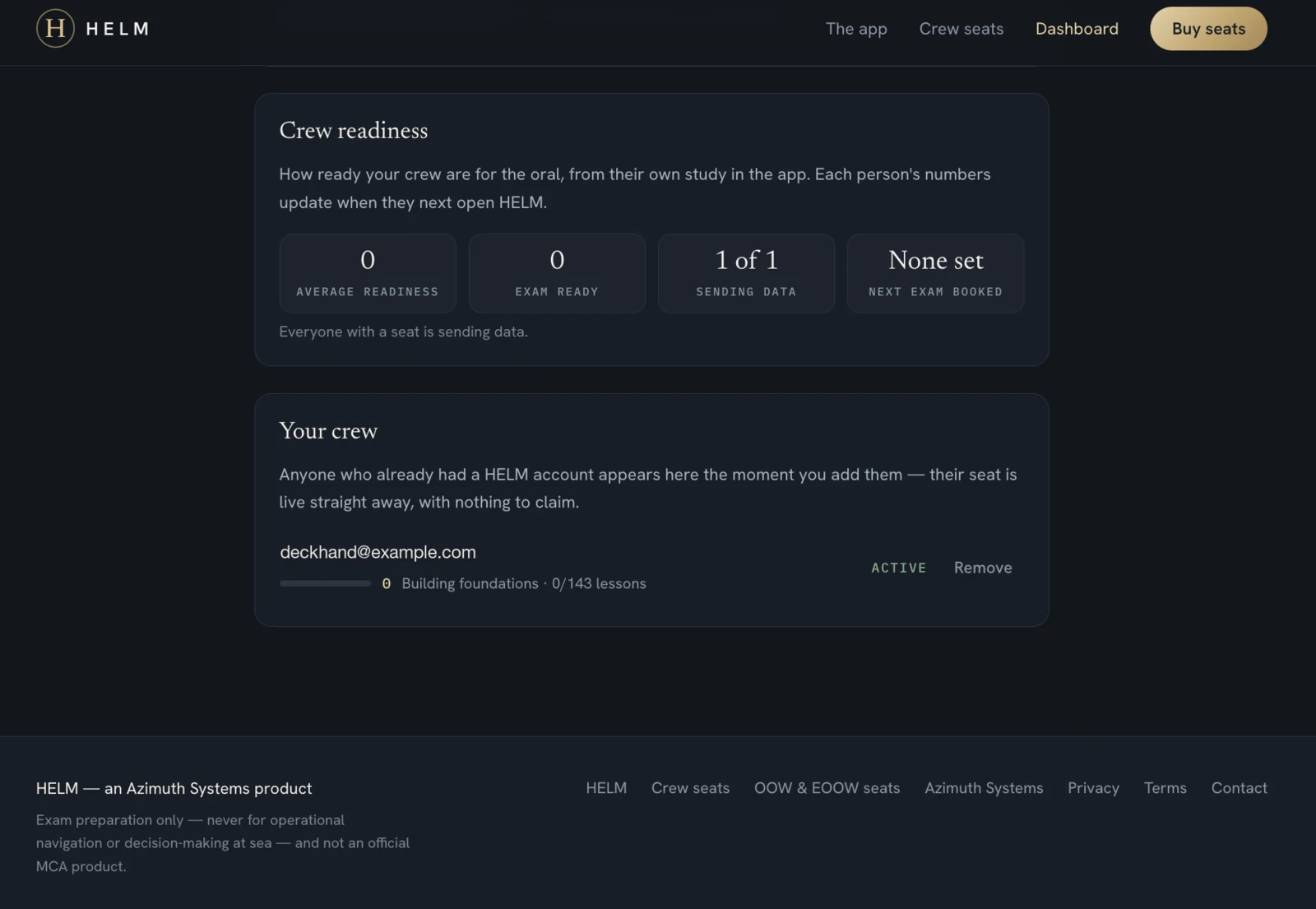
Crew readiness rolls the fleet up into four figures:
| Figure | What it answers |
|---|---|
| Average readiness | How prepared the crew is overall, across everyone actually studying. |
| Exam ready | How many people have crossed the readiness threshold. |
| Sending data | How many of your seat-holders are reporting at all — the honesty check on the other three. |
| Next exam booked | The soonest exam date anyone has set, so cover can be planned. |
Your crew lists each person with a readiness bar, a score, and the few facts behind it: readiness band (Building foundations · On track · Exam ready · Well prepared), lessons completed out of 143, flashcards mastered, mock exams taken with the average score, a practice streak, and their exam date if they have set one. Each row has Remove, which frees the seat instantly.
Three states are kept deliberately distinct, where a progress bar alone would collapse them into two:
- Has not opened the app yet — the seat is waiting. This is a chasing problem.
- Active, no study data yet — they are in, but nothing has come through. It appears after they next open HELM.
- Reporting — a real readiness score with real numbers behind it.
The difference between (1) and (2) is the difference between “your invitation is in your junk folder” and “you have not started revising”, and those need different conversations.
What you can see, and what you deliberately cannot
You see
Aggregate progress figures. Modules and lessons completed, flashcards mastered, mock exam scores, practice streak, readiness score and band, and the exam date they set.
You never see
Their answers, their AI oral examiner transcripts, which specific topics they are weak on, or anything they do outside HELM.
Per-module breakdowns were deliberately left out, because sixteen numbers per person stops being seat utilisation and starts being performance management. Oral transcripts were left out because the app promises the candidate they are private — and a mock exam a crew member is afraid to fail is worth nothing to anybody.
Every crew member is told exactly what their employer can see, in full, before they create an account. A seat that arrives with a surprise attached is the fastest way to lose a crew manager’s crew.
The questions that come up before buying
What happens when a crew member leaves?
Remove them and the seat is free immediately. Give it to their replacement. A seat belongs to the company, not to a person.
What if someone already pays for HELM themselves?
Invite them anyway. A company seat sits alongside a personal subscription rather than replacing it, and they can cancel their own whenever they like.
Can we add seats later?
At any time, prorated, and the rate drops for everyone the moment you cross a band.
How are we invoiced?
By card, monthly or annually, with a proper itemised invoice for every payment. No VAT is charged.
Do our crew need an account before we can invite them?
No. Invite any address. If they have an account the seat is live at once; if not, it waits for them.
Do we have to commit to a term?
No. Cancel from the billing portal.
What the crew actually get
Worth stating, because the seat is only worth what it unlocks. A HELM seat is the full app:
- 16 modules mapped to the MCA’s published oral examination syllabus — 143 lessons across navigation, response to emergencies, and onboard ship operations.
- Spaced-repetition flashcards, so revision schedules itself around a charter season rather than collapsing the week before.
- Timed mock exams with four question types.
- The AI oral examiner — a spoken mock viva that asks, presses for detail where an answer is thin, and returns a written grading report against the syllabus. This is the flagship, and it is the one thing a candidate cannot get from a textbook, a flashcard deck or a night alone in a cabin at 0200.
- Offline quick reference — lights and shapes, IALA buoyage, sound and distress signals, flags, VHF, Beaufort.
- Everything except the AI examiner works in airplane mode, which is the only specification that matters mid-Atlantic.
Start here
The whole journey — header link, calculator, checkout, password email, first invitations — takes about four minutes. There is no call to book and no quote to wait for.
Questions first? info@azimuthsystemsltd.com — a person answers.